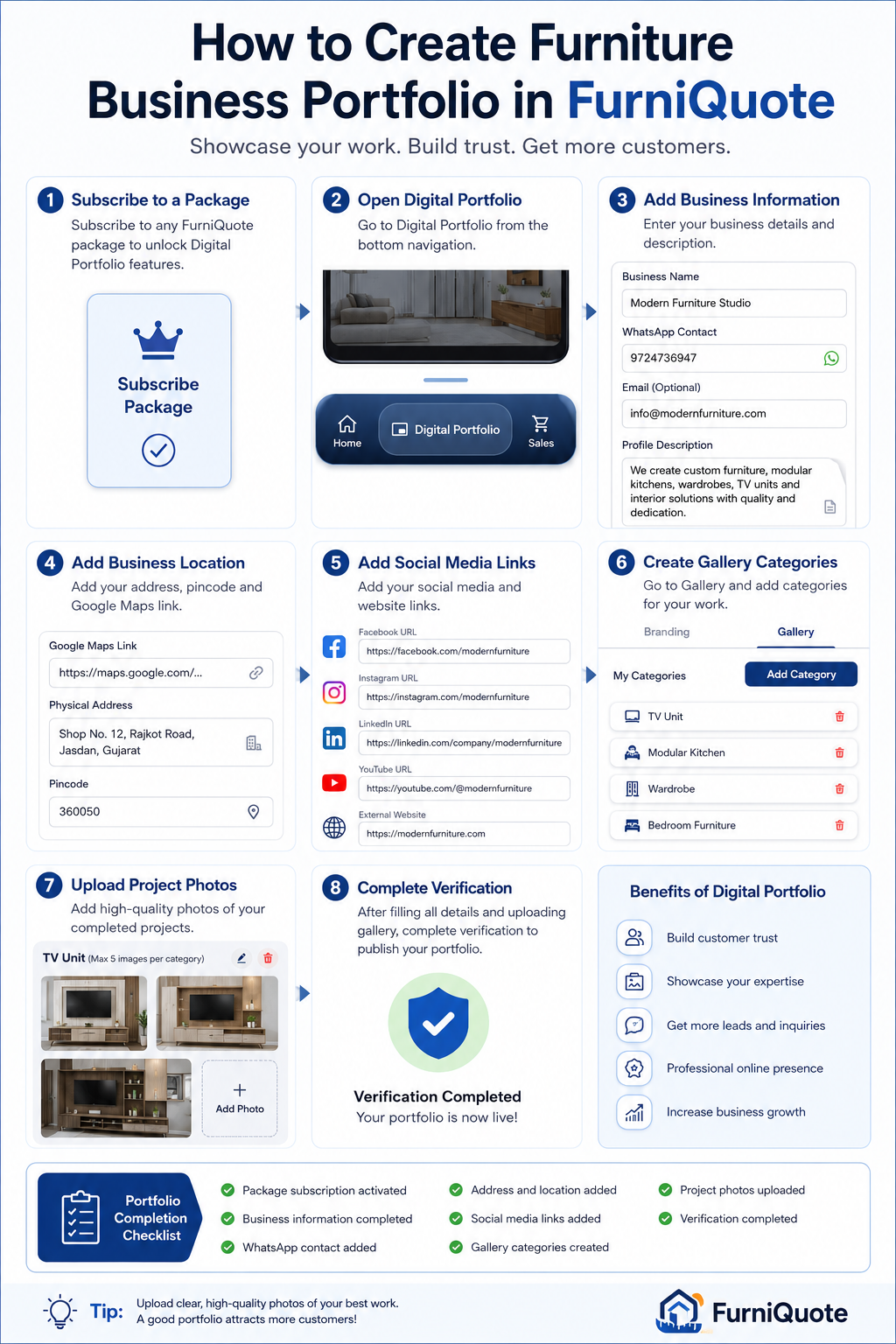
In today's competitive furniture market, customers want to see your work before making a purchase decision. A professional portfolio helps furniture manufacturers, carpenters, interior designers, and modular furniture businesses showcase their completed projects, build trust, and attract more customers.
With FurniQuote's Digital Portfolio feature, you can create your own online business profile and display your best furniture work in a
professional way.
Watch youtube video https://youtu.be/ZufWGaBc954
Step 1: Subscribe to a Package
Before accessing the Digital Portfolio feature, you need to subscribe to any available FurniQuote package.
Once your subscription is activated, the Digital Portfolio menu will be enabled in your account.
Step 2: Open the Digital Portfolio Section
After activating your package:
- Open FurniQuote
- Navigate to Digital Portfolio
-
You will see two main sections:
- Branding
- Gallery
The Branding section allows you to add your business information.
Step 3: Add Your Business Information
Fill in your business details carefully.
Business Name
Enter your furniture business name.
WhatsApp Contact
Add your active WhatsApp number so customers can contact you directly.
Email (Optional)
Provide your business email address.
Profile Description
Write a brief introduction about your business, including your services, experience, and specialties.
A well-written profile helps customers understand your business and builds confidence in your work.
Step 4: Add Your Business Location
Complete your location information.
Google Maps Link
Paste your business location link from Google Maps.
Physical Address
Enter your workshop, office, or showroom address.
Pincode
Add your area's postal code.
Providing accurate location information helps customers find and trust your business.
Step 5: Add Social Media and Website Links
Under the Social Presence section, add your business links:
- Twitter/X
- YouTube
- External Website
Social media links allow customers to explore more of your work and verify your business presence online.
Step 6: Create Gallery Categories
Switch to the Gallery tab.
Click Add Category and create categories based on your work, such as:
- TV Unit
- Modular Kitchen
- Wardrobe
- Bedroom Furniture
- Office Furniture
- Dining Table
- Interior Design
- Custom Furniture
Organizing projects into categories makes your portfolio more professional and easier to browse.
Step 7: Upload Your Best Project Photos
Inside each category, click Add Photo and upload images of your completed projects.
Tips for Better Results
- Upload clear and high-quality photos.
- Use images of completed work.
- Show multiple angles of furniture.
- Upload your best projects first.
- Keep images properly lit and professional.
Your gallery is often the first thing customers evaluate before contacting you.
Step 8: Complete Verification
After adding:
- Business information
- Address details
- Social media links
- Gallery categories
- Project photos
Complete the verification process.
Verification helps create a more trustworthy and professional business profile.
Portfolio Completion Checklist
Before submitting for verification, make sure:
✅ Package subscription activated
✅ Business information completed
✅ WhatsApp contact added
✅ Profile description added
✅ Address completed
✅ Google Maps link added
✅ Social media links added
✅ Gallery categories created
✅ Project photos uploaded
✅ Verification completed
Benefits of a Digital Portfolio
Build Customer Trust
Show real furniture projects and completed work.
Generate More Leads
Give potential customers a reason to contact you.
Showcase Your Expertise
Highlight different furniture categories and designs.
Improve Professional Branding
Create a strong digital presence for your furniture business.
Increase Conversion Rates
Customers are more likely to place orders when they can view your previous work.
 Get on Play Store